Form CG-719K: Application for Medical CertificateUpdated 15 days ago
How to Complete Your Medical Exam and Get Your Coast Guard Medical Certificate
What is Form CG-719K used for?
Form CG-719K is used to apply for a Coast Guard medical certificate, which confirms that you meet the medical and physical standards needed to safely perform your duties as a mariner.
The National Maritime Center (NMC) reviews your completed form, examination results, and any supporting medical documentation to evaluate your:
Vision and hearing needed for navigation, communication, and recognizing alarms.
Physical ability to perform routine and emergency duties.
Medical conditions and medications that could affect your ability to serve safely.
Your healthcare provider documents your examination on the CG-719K, but the Coast Guard makes the final decision on whether to issue your medical certificate, including any necessary waivers or limitations.
A Medical Certificate application cannot be finished in one sitting. You start it online, take a printed form to a medical provider for examination and signature, then return to Navita to upload the completed form and finish.
What should I have ready before starting my medical certificate application?
Before you begin, have the following ready:
The license or endorsement you are applying for. For an OUPV or Master’s captain’s license, use Form CG-719K.
A copy of any existing medical waiver you hold.
A list of prescription and nonprescription medications you take, including the dates you took them.
A qualified medical provider to complete your examination—a physician (MD or DO), physician assistant, or nurse practitioner licensed in a U.S. state, possession, or territory. A chiropractor is not an authorized provider.
Confirm that your provider can complete the CG-719K and arrange the required vision and hearing testing before scheduling your appointment.
How do I complete this form?
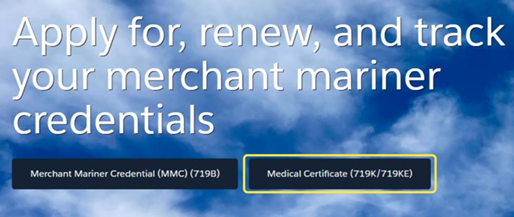
To complete the form, log in to your Navita™ Portal on the Coast Guard's National Maritime Center's website, and select "Medical Certificate (719K/719KE)" from the home page:
When asked which credential you are applying for, select "Officer", then select "CG-719K".
Navita™ will walk you through various online sections you must complete, such as a privacy notice, instructions, applicant information, medical conditions, medications, applicant signature, applicant consent, and then final review.
Medical Conditions
When you reach the medical conditions, mark "Yes" or "No" for each condition. If you hold a medical waiver, answer "Yes" and give a copy of the waiver to the provider who completes your form.
Medications
For the medications section, enter every medication you have taken, following the requirements on the page. What you enter is printed on the form for your practitioner to review and verify.
⚠ CAUTION: Bring the paperwork behind your answers. If additional medication documentation is required, include the appropriate supporting documentation with your application.
Applicant Signature
The Applicant Signature section confirms that you have reviewed the information in your application and certify that it is complete and true. You must sign before you can continue.
Applicant Consent
Consent is voluntary. Decline means you give permission for none of the consent options. If you do not decline, you must consent to your practitioner releasing medical information to the U.S. Coast Guard by selecting the Signature of Applicant checkbox.
Once I complete the form online, what do I do next?
The Download Form page is the hand-off to your medical provider. It carries the instructions for the rest of the process.
You will...
- Print the form: Print it once you have completed every online section. Take it to your appointment, along with copies of any prior medical waivers.
- Your provider examines and signs: The provider performs the examination, completes the applicable sections, and signs and dates the form where indicated.
- Upload the completed form: Return to Navita™, upload the completed and signed form, confirm the upload succeeded, and upload copies of any prior medical waiver.
⚠ CAUTION: CG-719K is uploaded and processed separately from the rest of your Merchant Mariner Credential application. Drug test results are part of the MMC application and should NOT be sent with your CG-719K application. Pay close attention to the submission process; more details are available here.
How do I upload my completed medical form?
Once your medical provider has completed CG-719K, you need to upload it back into the Navita™ portal. To do this, you will...
- Go to the Application Page to reach the Application Record page, then open the Upload Document tab
- Select Upload Files and choose the completed PDF, plus any supporting documentation
- Select Next at the bottom right
- An Upload Successful message appears
- Select Submit Application
- The Document Status changes to Submitted
Where can I get my physical?
You can schedule your physical at a doctor’s office, walk-in clinic, or occupational health clinic that performs employment physicals. Confirm beforehand that the provider can complete Form CG-719K for a Coast Guard medical certificate.
The examination may be completed by a U.S.-licensed physician (MD or DO), physician assistant, or nurse practitioner. Each practitioner signing the form should provide their full name, office address, phone number, license information, signature, and date.
💡 TIP! Before scheduling, ask whether the office can perform the required vision, color vision, and hearing tests. These tests may be completed by qualified staff or another provider, but the medical practitioner completing your CG-719K must review the results. Bring the current form and a valid government-issued photo ID to your appointment.
What do I select when asked Endorsement Held or Sought?
When completing the online section Applicant Information, you will be asked to record the endorsement you hold or are seeking. You will want to check off "Deck," because a captain's license is classified as a deck license. Do not select "Other".
👀 Check out this document on common errors mariners make when submitting CG-719K.
Can I authorize someone to help with my medical certificate application?
Yes. The Third Party Consent section in Navita™ collects information about a medical proxy or another authorized person who may assist with your medical certificate application. This information is printed on the medical certificate application form for the NMC’s use.
Mariners Learning System is not a third party; do not put us down.
Entering someone’s details does not send them an invitation or give them access to your medical application in Navita™. In Navita™ Release 1.0, medical third parties do not receive system access. This differs from an MMC application, where a proxy may be granted portal access.
How long do I have to complete this form when applying to the Coast Guard?
The examination and CG-719K must be completed within 12 months of the application date.
If you complete your medical examination while still working on other captain’s license application components, you can submit your CG-719K independently through Navita, as medical submissions are processed separately from the rest of your application.
Make sure your examination is completed in a timely manner to avoid delays in processing your application.
I recently completed a physical. Can I submit the form the doctor used for this?
No. The Coast Guard requires your medical examination to be documented on Form CG-719K. A standard physical exam form cannot replace it.
If you recently had a physical, contact your provider to ask whether they can complete the CG-719K using those examination results and perform any additional testing required.
What is the cost of the medical certificate?
The Coast Guard does not charge a fee to issue a medical certificate. However, your healthcare provider may charge for the physical examination and any required testing.
Standard Merchant Mariner Credential (MMC) fees still apply under 46 CFR Table 10.219(a). Receiving a medical certificate does not change those fees.
How long will it take for me to receive my medical certificate from the NMC?
Processing times vary depending on the medical conditions reported, the completeness of your application, and any supplemental information needed. In 2025, the NMC reported an average net processing time of 9.68 days, excluding time spent waiting for additional information from applicants.
Once issued, most medical certificates without a waiver are sent by email. If email delivery is not possible, no valid email address is provided, or the certificate includes a medical waiver, it will be mailed instead.
You can monitor your application’s status through Navita™. If your certificate shows as Issued but you have not received it, contact the National Maritime Center.
What are the dates of examination and expiration?
Date of Examination
For medical certificate purposes, the Coast Guard uses the date it approves the certificate as the date of examination. This differs from the date your medical provider signed the CG-719K and may differ from the issuance date of your medical certificate or Merchant Mariner Credential (MMC).
Date of Expiration
For national endorsements, including OUPV and Master’s captain’s licenses, medical certificates are valid for up to five years. Always check the expiration date printed on your certificate.
What if I am receiving a medical waiver?
Under 46 CFR 10.303, the Coast Guard may grant a waiver if you do not meet certain medical standards, but medical evidence shows your condition is sufficiently controlled and any medication effects pose no significant risk to maritime or public safety.
The Coast Guard reviews your supporting medical documentation and may consult your examining provider before making a decision. If approved, your waiver may require periodic medical reports, additional testing, or limitations on how or where you can operate. Follow all requirements outlined in your waiver.
📽️ Here is a video on medical disqualifiers.
What can I do if my medical waiver gets denied?
You may request reconsideration from the National Maritime Center (NMC). If you disagree with the reconsideration decision, you may then submit a formal appeal, following 46 CFR 1.03-40.
Requesting Reconsideration
Submit a written request through the NMC’s online application portal within 30 days of the date on your denial letter. Explain why you believe the decision should be changed and include:
Any errors you believe were made.
New medical records, test results, or other supporting information.
Any circumstances you believe warrant additional consideration.
A copy of your denial letter.
The NMC will review your request and notify you whether it has reversed, modified, or upheld its original decision. Follow the submission instructions in your denial letter and retain copies of everything you submit.
Filing a Formal Appeal
If reconsideration is denied, you may appeal to the Director of Commercial Regulations and Standards (CG-5PS) at Coast Guard Headquarters. Under 46 CFR 1.03-15, your written appeal must be received within 30 days of the reconsideration decision, unless an extension is granted.
Send your signed and dated appeal to [email protected]. Explain why the decision should be changed and include the reconsideration denial letter and supporting documentation. Mailing instructions are available on the NMC’s Appeal and Reconsideration page.
The denial remains in effect during reconsideration or appeal unless the Coast Guard grants a stay.
What do I do with the medical certificate when I receive it?
Sign your certificate, check its expiration dates, and keep it available with your Merchant Mariner Credential (MMC) when operating under its authority.
Sign Your Certificate
Your medical certificate is not valid until you sign it. If you receive it by email, you may sign the PDF electronically or print it and sign it by hand. The NMC recommends keeping a printed, signed copy for your use.
Store It Securely
Save your electronic certificate and protect your paper copy from damage. Certificates delivered by email are standard 8.5 × 11-inch PDFs; follow the handling instructions provided with your certificate.
Check the Expiration Dates
Review the expiration dates that apply to your service and plan to renew before your certificate expires. Your medical certificate may expire before your MMC.
If You Have a Medical Waiver
Read the accompanying waiver letter carefully and follow all medical reporting, testing, and operating requirements. Carry the waiver letter with your medical certificate whenever serving under the authority of your MMC.
A waiver may result in a shorter validity period, so use the expiration date printed on your certificate.
To learn more about what to do once your medical certificate arrives, read Medical Certificate Issued.
How do I request a duplicate medical certificate?
Contact the National Maritime Center (NMC) Customer Service Center using the information in our Contact the Coast Guard article.
A representative will verify your information and arrange to resend your certificate. No affidavit or new application is required.
If you are waiting for a recently issued certificate, allow time for delivery and check your email’s spam or junk folder before requesting another copy.
Should I use Form CG-719K or CG-719K/E?
If you are applying for an OUPV/Six-Pack or Master’s captain’s license, use Form CG-719K. The shorter CG-719K/E does not meet the requirements for a captain’s license.
CG-719K - Standard application: Used for officer endorsements, including captain’s licenses, and entry-level applicants who need qualification for lookout duties. It covers medical history, medications, vision, hearing, physical examination, and the provider’s evaluation.
CG-719K/E - Short form: Used by eligible entry-level or staff officer applicants who need a medical certificate for STCW or Maritime Labour Convention requirements but will not stand navigational or engineering watches. It does not authorize lookout duties.
⚠ DISCLAIMER
USCG practices, with respect to the physical and medical evaluation process, continually evolve to align with current medical standards of care and current safety standards. Although Chapters 8 through 25 of the Merchant Mariner Medical Manual, Commandant Instruction Manual (COMDTINST M16721.48) provide guidance on medical conditions that may be subject to further review, the list of conditions is not all-inclusive; other conditions may be subject to further review if they are likely to pose a risk of sudden incapacitation or a debilitating complication.
For the most current medical information available, please contact the Contact the Coast Guard's National Maritime Center.
Put your UNDERSTANDING to work
Knowledge Check
Ready for your next step? Choose one answer for each question, then select Reveal Answer to see how you did.
QUESTION 1 OF 5
Which medical form should you use for an OUPV/Six-Pack or Master's captain's license?
- CG-719B
- CG-719K/E
- CG-719K
- A standard physical examination form
Reveal Answer
C - CG-719K
This is the medical certificate application required for OUPV and Master’s captain’s licenses. The shorter CG-719K/E and a standard physical examination form cannot replace it.
QUESTION 2 OF 5
Who may complete your CG-719K medical examination?
- U.S.-licensed physician, physician assistant, or nurse practitioner
- Licensed chiropractor who performs employment physicals
- Registered nurse working without a qualified medical practitioner
- Licensed pharmacist who reviews your medications
Reveal Answer
A - U.S.-licensed physician, physician assistant, or nurse practitioner
Confirm that your provider can complete the CG-719K and arrange the required vision and hearing testing.
QUESTION 3 OF 5
After completing the online sections in Navita™, what must you do to finish your medical application?
- Wait for the NMC to schedule your examination.
- Upload an unsigned form and provide the signature after approval.
- Have your provider keep the signed form and upload your appointment receipt.
- Print the form, have your provider examine and sign it, then upload and submit it in Navita™.
Reveal Answer
D - Print, complete, upload, and submit
Your provider must perform the examination and complete and sign the form. Return to Navita™, upload the completed form and supporting documents, confirm the upload succeeded, and select Submit Application.
QUESTION 4 OF 5
How should you submit your CG-719K and drug test results?
- Submit both with your medical certificate application.
- Submit CG-719K separately and include drug test results with your MMC application.
- Submit both with your MMC application.
- Submit drug test results only if your medical application is denied.
Reveal Answer
B - Submit CG-719K separately; include drug test results with your MMC application
Medical certificate applications are uploaded and processed separately from MMC applications. Do not include drug test results with your CG-719K submission.
QUESTION 5 OF 5
What must you do before your newly issued medical certificate is valid?
- Have your medical provider sign the issued certificate.
- Upload it with a new MMC application.
- Sign it electronically or by hand.
- Wait until its expiration date matches your MMC.
Reveal Answer
C - Sign it electronically or by hand
Your medical certificate is not valid until you sign it. The NMC recommends keeping a printed, signed copy for your use.
How did you do? If you missed a question, revisit that section of the article before starting your application.