Locate Expiration Date and Time on Course LockerUpdated 8 months ago
Steps to Locate Your Program Expiration Details
Where can I find when and what time my Mariners Learning System program expires?
If you need to check how much time you have left in your Mariners Learning System program, you can easily find your program’s expiration date and time directly on your Course Locker page.
All expiration times are displayed in Eastern Standard Time (EST).
Enter your email and password
If you do not remember your password, click Forgot Your Password?
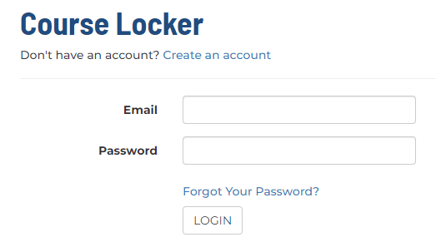
Click LOGIN
You will automatically be taken to your Course Locker
Locate the course or program you want to review
Directly beneath the course name, you will see the expiration date and time clearly listed
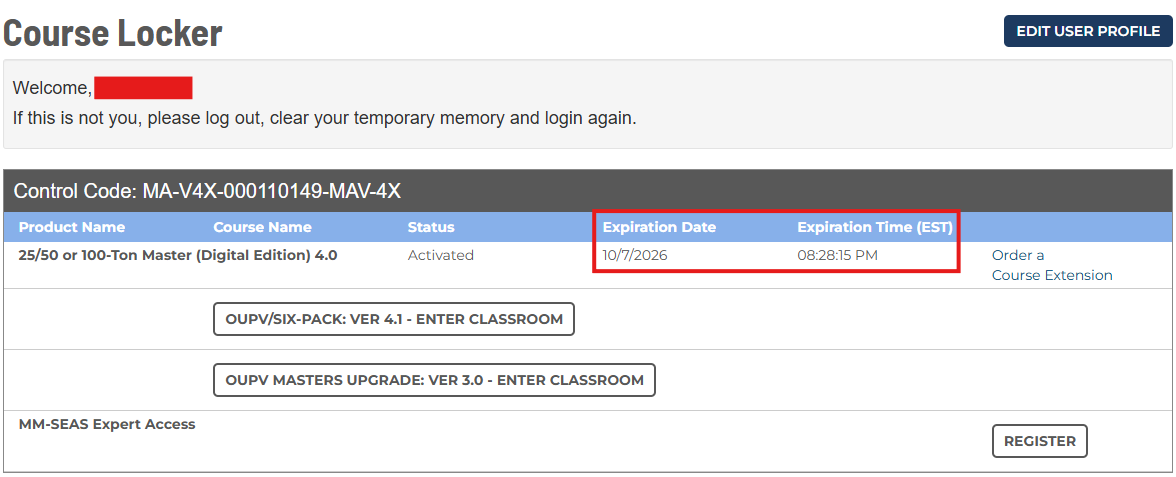
This information helps you keep track of your progress and ensures you complete your coursework and pass your final exam before your access expires.
What happens if my course is close to expiring or has already expired?
If you do not believe you will complete your course and/or final exam before your expiration date - or if your course has already expired - you will need to order a Course Extension.
Read the details of the Course Extension product page carefully before placing your order.