
How to Use Your Rewards PointsUpdated 8 months ago
Make the Most of Your Loyalty Points
Our rewards program is designed to thank you for being part of the Mariners Learning System community! By earning and redeeming points, you can save on future purchases and enjoy extra perks along the way. Here’s everything you need to know to get the most from your loyalty points.
How can I earn reward points?
You can earn points in several ways, including:
- Making purchases on our website
- Completing activities such as creating an account, writing reviews, or referring friends (when applicable)
- Following or engaging with us on social media
- And much more!
Visit your Account Details page to view your current balance and see all available earning activities.
If you don't have a store account, create one here.
How do I view my current point balance and the ways I can earn more?
To check your points and explore earning opportunities:
Log in to your store account
Make sure you're signed in to the account associated with your rewards
Scroll down slightly until you see “Hi, [Your Name]!” - your current points total will appear right below your name
Continue scrolling to find the “Ways to Earn” section
Hover over each tile to see the actions you can take to earn additional points
How do I redeem my points at checkout?
Follow these simple steps to use your points and save on your next purchase:
Log in to your store account
Add the items you’d like to purchase to your cart
Go to your Shopping Cart and click Checkout
You’ll see your available points displayed on the checkout page
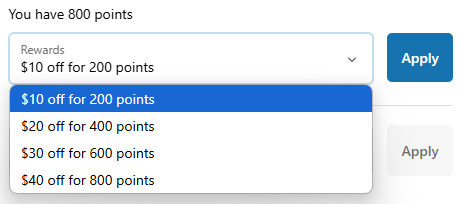
Select how many points you’d like to redeem from the drop-down menu
Click Apply - your discount will appear automatically
🚫 IMPORTANT NOTE: You CANNOT combine reward points and discount coupon codes on the same order.
How can I use my points?
You can redeem your points for instant savings at checkout. Here’s a quick breakdown of the available rewards:
| Reward | Points Required |
| $10 Off | 200 Points |
| $20 Off | 400 Points |
| $30 Off | 600 Points |
| $40 Off | 800 Points |
When checking out, simply select how many points you'd like to redeem, and the discount will automatically apply to your order (as long as your cart total meets the minimum required).
Do my points expire?
Yes. Points are valid for 365 days from the date of your most recent completed point-earning activity.
Is there a minimum purchase required to use points?
Yes. Your cart total must be equal to or greater than the value of the points you’re redeeming.
Can I combine points with other discounts?
Points cannot be combined with other discount codes or promotional offers.
How can I review my rewards history?
You can easily view a detailed history of all your earned and redeemed points. Here's how:
Go to your Account Details page
Scroll down until you see the “Rewards History” section
Click the Rewards History button
A pop-up window will appear showing your full activity list, including:
Date of activity
Action (earned, redeemed, etc.)
Points gained or used
Status of the points
Expiration date
This gives you a complete, transparent view of your rewards activity at any time.