
How to Activate MM-SEAS Expert AccessUpdated 8 months ago
Step-by-Step Guide to Activating MM-SEAS Expert Access
How do I activate my MM-SEAS Expert Access membership?
Activating your MM-SEAS Expert Access membership is a simple process that begins in your Course Locker after enrolling in one of our captain’s programs. Follow these steps to activate your membership:
Step 1: Activate Your Online Captain’s Program
- Log in to your account and go to your Course Locker page
- Click on your captain’s course to activate it
- Once activated, a second line item will appear labeled MM-SEAS Expert Access with a REGISTER button
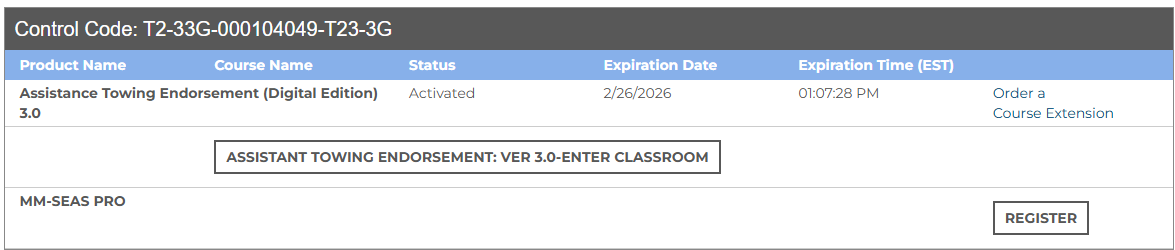
Step 2: Begin Your Studies
- Before activating MM-SEAS Expert Access, start your coursework and progress through your studies
- MM-SEAS Expert Access is a tool designed to help you with your USCG license application process, so you won't need it immediately
Step 3: Register for MM-SEAS Expert Access
When you're ready to activate your MM-SEAS Expert Access membership (either before testing or after passing), return to your Course Locker and follow these steps:
- Click the REGISTER button next to MM-SEAS Expert Access
- A pop-up will appear asking you to confirm that we can share important data with MM-SEAS, including your Course Completion Certificate, once you pass
- Click YES, I AGREE to proceed
- After confirming, the REGISTER button will change to GO TO MM-SEAS
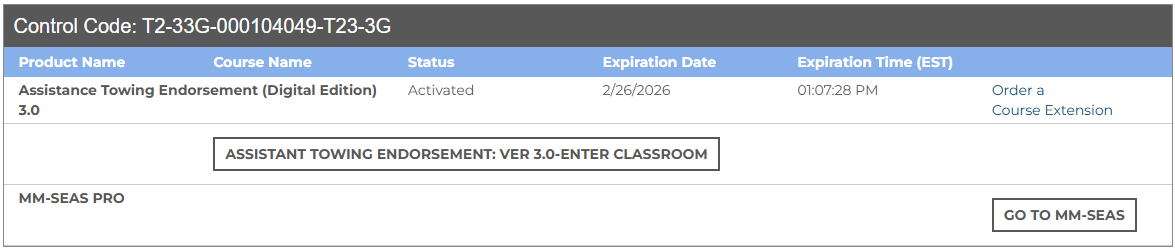
Step 4: Create Your MM-SEAS Account
- Click GO TO MM-SEAS to be redirected to the MM-SEAS portal
- Follow the prompts to create your MM-SEAS account or log in if you already have one
- Once registered, you'll have access to MM-SEAS Expert Access to assist with your USCG license application
- Upload all of your application forms into their portal, then set up a 1-on-1 call to make sure your application is ready for submission
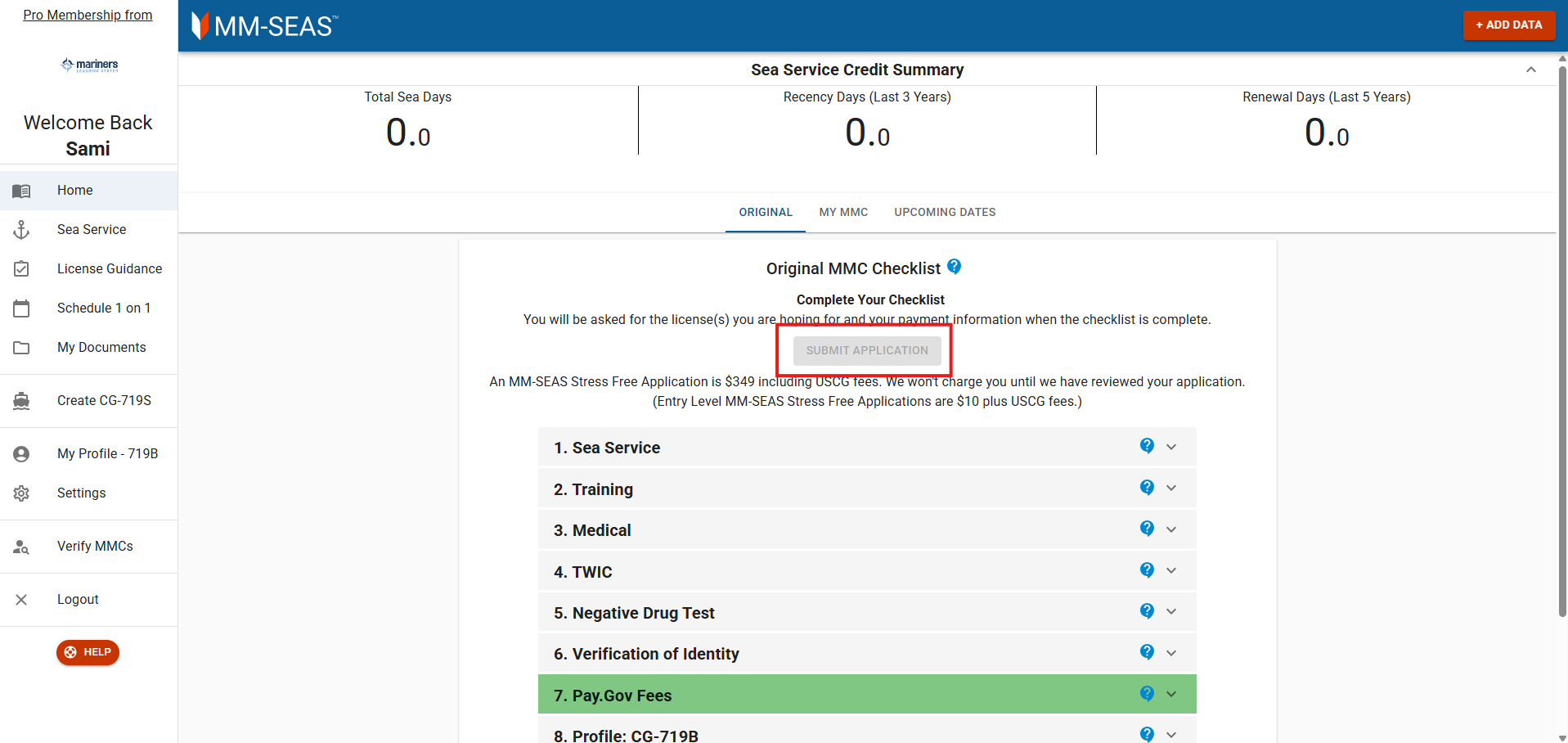
⚠ REMINDER: You must submit all your forms in order for them to give you the green light to submit to the Coast Guard. Once all forms are uploaded to your MM-SEAS portal, you will click SUBMIT APPLICATION. The Expert Access membership does not cover MM-SEAS filling out the forms or submitting on your behalf.
When should I activate my MM-SEAS Expert Access membership?
💡 TIP! We recommend two ideal times to activate your MM-SEAS Expert Access membership, depending on your goals and learning style:
While working through your course - Many students choose to activate Expert Access as they progress through their course (around the 75% mark or sooner). This allows you to start logging sea service, gathering required documents, and getting familiar with the next steps in the licensing process. It’s a great option if you’re eager to stay organized and move quickly toward your USCG license after passing your exam.
After completing your final exam - Other students prefer to wait until after they’ve passed their course. This approach keeps the focus on completing one milestone at a time and helps prevent overwhelm—especially for those pursuing their captain’s license for personal knowledge, safety, or recognition rather than professional use.
Either way, activating at the right time ensures your 2-year free access aligns with the period when you’ll be actively preparing and submitting your USCG license application.
How long is my MM-SEAS Expert Access membership valid?
Once you activate MM-SEAS Expert Access through your Course Locker, you will have 2 years of free access.
NOTE: MM-SEAS offers a higher-level membership. An MM-SEAS Perfect Application is $249 + Pay.Gov fees.
Are there additional costs?
Mariners always have the option to submit their application independently. However, for those seeking a stress-free MMC application, the MM-SEAS team of credentialing experts will meticulously review the application, track it from start to finish, and handle all communication with the Coast Guard for $249 + Pay.Gov fees.
🤔 Unsure what the Mariners White Glove Service is? Read over this article to learn about its benefits!