How to Submit Your Captain’s License Application PacketUpdated 6 months ago
Avoiding Common Mistakes in Your Captain’s License Application Submission
You are so close to having your captain's license in hand 🥳
Where do I send my captain's license application forms?
As of January 26, 2026, the National Maritime Center (NMC) now uses NMC Application Submission and Additional Information Portal (ASAP) as the primary method for submitting applications and additional documents for both new and existing applications. You will receive an email confirmation once your files have been successfully submitted.
Submission options, such as email or fax, will not be accepted.
Watch the video below to learn more about ASAP, and follow a step-by-step tutorial on submitting your application and documents through the portal.
RECOMMENDATION! We strongly suggest submitting your complete application packet to the Coast Guard at least 90 days before your Certificate of Completion expires. This buffer allows ample time to address any potential follow-up questions, missing documents, or additional requirements the Coast Guard may request - helping you avoid last-minute issues or risks of approaching your expiration date.
How do I use the NMC Application Submission and Additional Information Portal (ASAP)?
Merchant Mariner Credentials
You will be submitting all documentation, except the CG-719K for the Medical Certificate, through the Merchant Mariner Credentials (MMC) within the NMC Application Submission and Additional Information Portal (ASAP).
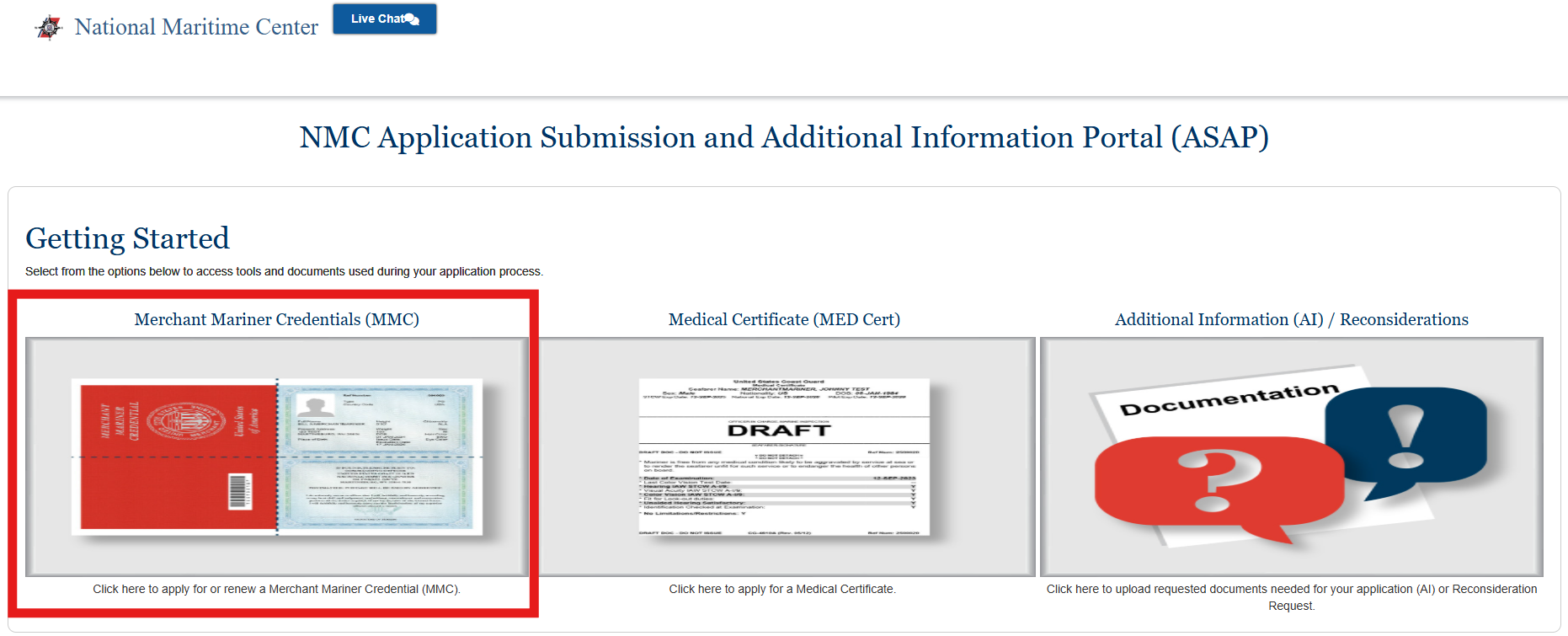
How to Complete the MMC Document Upload Portal
Use the MMC Document Upload Portal to submit your complete application package. Follow the steps below to ensure your documents are successfully uploaded.
Before You Begin
- Make sure all required application documents are ready
- Files must be in PDF format only
- Password-protected PDFs for viewing are not accepted
- You may upload up to 15 PDF files, each no larger than 75MB
Step-by-Step Instructions
- Enter Mariner Information
- Complete the required fields at the top of the form:
- Mariner Last Name (required)
- Enter your legal last name as it appears on your application documents
- Mariner Email Address (required)
- Enter the email address where you want confirmation or follow-up communication sent
- Alternate or Third Party Email Address (optional)
- Use this field if another person or a backup email should receive copies of communications, including an employer, agent, or third-party representative
- Mariner Reference Number (optional)
- Enter your reference number if you have been previously issued one by the National Maritime Center
- For first-time applicants, you will not have a reference number YET, so you will leave this field blank
- Mariner Last Name (required)
- Complete the required fields at the top of the form:
- Upload Your Documents
- Click Upload
- Select your PDF files from your device
- IMPORTANT! You will NOT upload CG-719K at this step; that portion is uploaded in a separate section of the portal. Instructions are listed below.
- Confirm that:
- All files are PDFs
- None are password-protected from viewing
- Your full application package is included
- You can upload multiple files at once, up to the allowed limit
- Submit Your Application
- Review your information and uploaded files
- Click Submit to complete the upload process
- Once submitted, your documents will be received for processing
- You will receive an email confirmation shortly after you submit your application
Important Notes
- Submitting incomplete application packages may delay processing
- Do not submit the same application multiple times unless instructed
- If you experience upload issues, double-check file size, format, and password protection from viewing
Medical Certificate
For your CG-719K, you will be applying for your Medical Certificate under the Medical Certificate (MED Cert) within the NMC Application Submission and Additional Information Portal (ASAP).
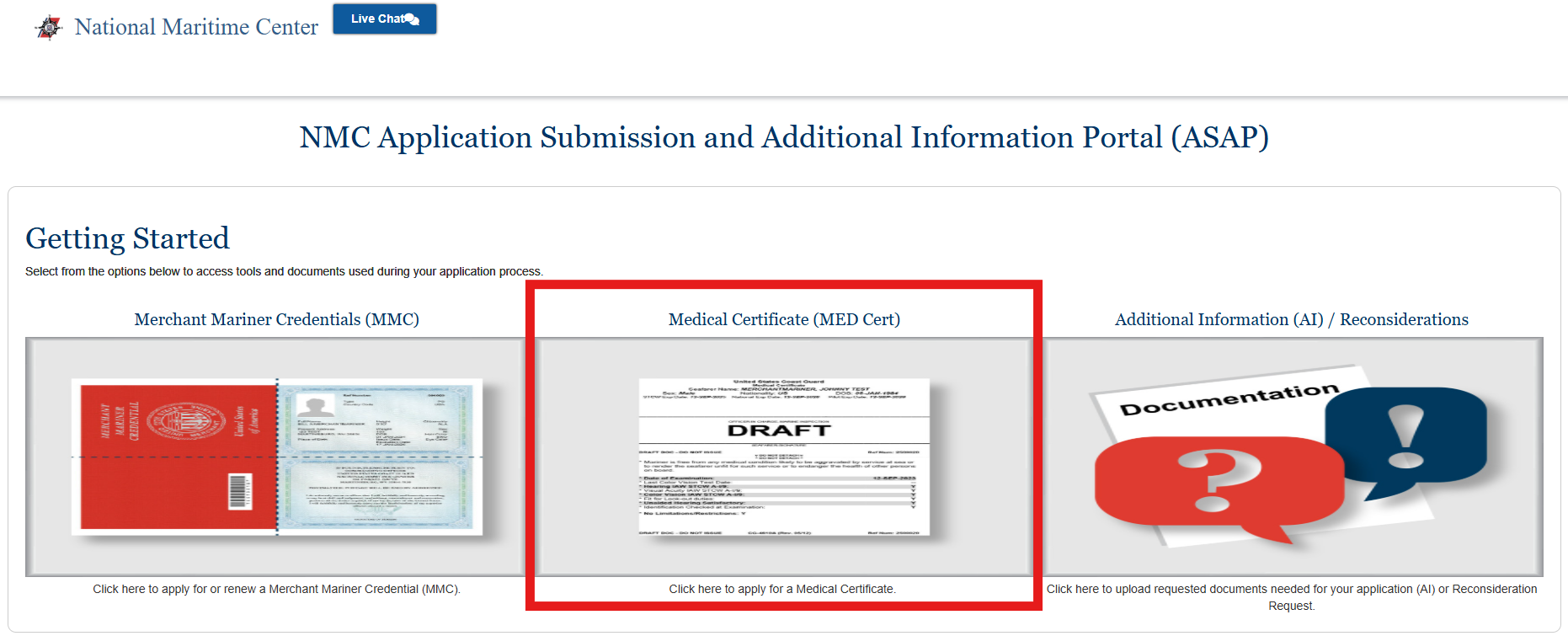
How to Upload Form 719K Using the Medical Document Upload Portal
Use the Medical Document Upload Portal to submit your completed CG-719K Medical Certificate. Follow the steps below to ensure your medical document is uploaded successfully.
Before You Begin
- Your CG-719K form must be fully completed and signed
- Save the form as a single PDF file
- Do NOT submit password-protected PDFs
- Only one PDF file may be uploaded (maximum size 75MB)
If you are unsure which sections are required, refer to the 719K example with required fields highlighted, linked at the top of the page.
Step-by-Step Instructions
- Enter Mariner Information
- Complete the required fields in the form:
- Mariner Last Name (required)
- Enter your legal last name as it appears on your 719K form
- Mariner Email Address (required)
- Enter the email address where you want confirmation and follow-up communication sent
- Alternate or Third Party Email Address (optional)
- Use this field if another person or a backup email should receive copies of communications, including an employer, agent, or third-party representative
- Mariner Reference Number (optional)
- Enter your reference number if you have been previously issued one by the National Maritime Center
- For first-time applicants, you will not have a reference number YET, so you will leave this field blank
- Mariner Last Name (required)
- Complete the required fields in the form:
- Upload Your 719K PDF
- Click Upload
- Select one PDF file containing your completed 719K form
- Confirm the file is:
- A single PDF
- Not password protected
- Complete and readable
- Submit Your Medical Document
- Review your information and the uploaded file
- Click Submit to complete the upload
- Once submitted, your medical document will be received for processing
- You will receive an email confirmation shortly after you submit your application
Important Notes
- Submitting more than one file will result in an error
- Incomplete or unsigned 719K forms may delay processing
- Do not upload any other documents besides the one required for the Medical Certificate issuance
How do I email my application packet?
Email submission options are no longer accepted. To ensure the fastest and most reliable processing, applicants should submit all materials through the Application Submission and Additional Information Portal (ASAP) whenever possible.
What if I do not have an email? Can I apply by fax or mail?
You cannot submit your application packet via fax.
If you wish to mail in your application, please contact the Coast Guard.
How will I know if the Coast Guard has received my application by mail?
Please allow 1 week for USPS delivery. Then contact the National Maritime Center's Customer Service Center at (888) 427-5662 to confirm receipt.
Typically, you will receive an email with a tracking number that lets you monitor the status of your application.
Can I handwrite my application forms?
Handwritten forms are acceptable, as long as they can be read and understood by the NMC staff. Your full name and contact information are critical. This will allow them to reach you if any item needs correction.
What causes the most delays once I submit my application packet to the Coast Guard?
Coast Guard statistics indicate that most delays in the licensing process are due to mistakes or oversights in the preparation of the application paperwork.
If you submit an incomplete application (719B or 719K), you will either receive an awaiting information (AI) letter or the application will be returned to you, and YOUR CREDENTIAL WILL BE DELAYED!
How long until I get issued my captain’s license from initial submission?
The turnaround time depends on the license you are applying for. For original captain’s license applications, it normally takes between 4 to 6 weeks to be issued a license. The National Maritime Center is advising applicants to submit up to 90 days in advance.
How can I track the status of my captain’s license application?
The Coast Guard website has a Merchant Mariner Application Status form on their website, which you can use to check the status of your captain’s license application.
What are some preparation tips for submitting my complete application packet?
Follow these general preparation guidelines and information:
- Fillable forms and instructional videos are available on the National Maritime Center’s website or under the Resources tab on our website
- The preferred method for submission is via NMC Application Submission and Additional Information Portal (ASAP), as recommended by the National Maritime Center
- If mailing your application packet, ensure it is sent using a trackable method
- Copies of all forms may be submitted; however, retain the originals for your records or in case the Coast Guard requests them
- Merchant Mariner applications may be audited and verified by the Coast Guard during the evaluation process
How can I contact the National Maritime Center if I have questions about submission?
Questions regarding the submission process should be directed to the Customer Service Center at 1-888- IASKNMC (427-5662) or via the live chat option on the NMC website.