
Form CG-719B: Application for Merchant Mariner CredentialUpdated 15 days ago
Step-by-Step: Filling Out Form CG-719B for Your Captain's License
Click below to download the application form 👇
Application for Merchant Mariner Credential (Form CG-719B)
What is the CG-719B form?
Form CG-719B is completed online in the Coast Guard's Navita Portal and is used for all Coast Guard credentials for original first-time Coast Guard applications and license renewals.
How do I complete this form?
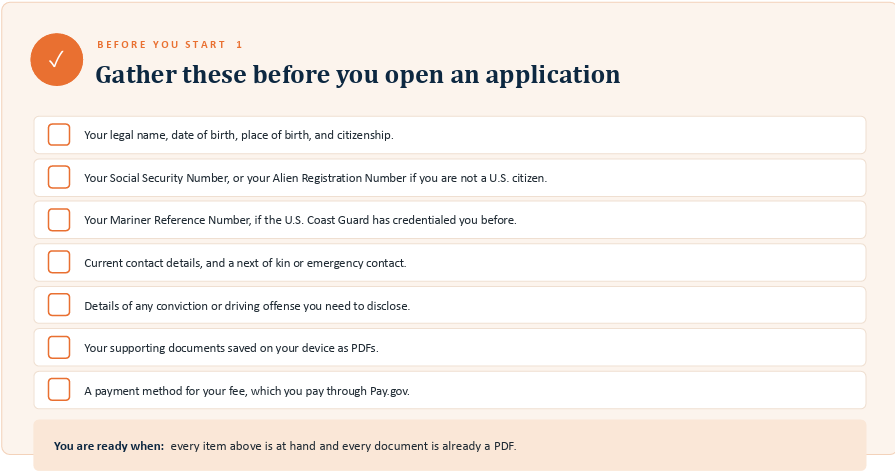
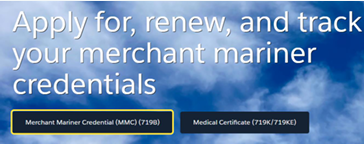
To complete the form, create or sign into your account on the Coast Guard's Navita Portal. From the home page, Select Merchant Mariner Credential (MMC) 719B. Work through each section, saving a draft and returning whenever you need to. Progress is saved each time you select "next".
Section I: Start Your Application
The Merchant Mariner Credential (MMC) is issued by the U.S. Coast Guard to authorize you to work aboard U.S.-flagged commercial vessels. The application verifies your qualifications, suitability, and fitness.
- Sign into your Navita account and check that your name appears in the top-right corner
- Select Merchant Mariner Credential (MMC) (719B) on the home page
- Read and acknowledge the Privacy Act Statement and select "Next".
- Read the form instructions pages and select "Next".
(Note: Next moves you forward; Previous returns you to an earlier section without losing what you entered. This pattern holds on every page)
Section II: Your Application Information
The Information section has three parts. All sections that are marked with a red asterisk are required fields.
(Note: Check your numbers before you move on. A mistyped Social, Alien, or Mariners Reference Number could delay processing your application)
Applicant Information: Include all required information, including legal name, alias, maiden name, citizenship, applicable reference numbers, place of birth, and physical description
(Note: Original applicants will not have a Mariner Reference Number yet.
Once you are issued a Merchant Mariner Credential (your captain's license), you will receive a Reference Number that will remain with you throughout your journey with the Coast Guard.
You may be using the SAME reference number across various Coast Guard application forms. Your reference number will not change from form to form, or from each communication with the Coast Guard. )
Applicant Address and Contact Information: Where and how you prefer to be contacted. A PO Box is not an acceptable home address. It can be used only as a mailing address.
Next of Kin/Emergency Contact: This is an optional field
Requested Coast Guard Credential(s)
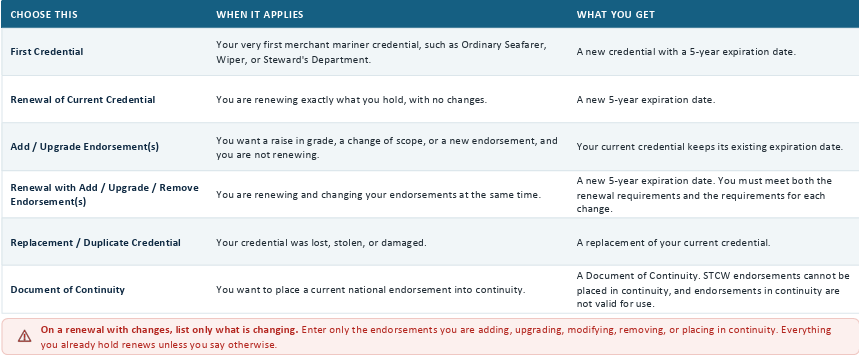
What transaction type do I choose for my Requested Coast Guard Credential(s)?
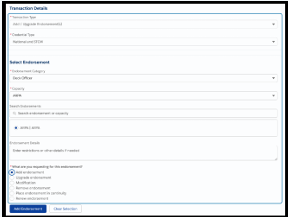
The Requested Credentials is where you will tell NMC what you are asking for. Your choice changes the fields that follow, so you must choose before you go any further.
What Endorsements do I choose for my Requested Coast Guard Credential(s)?
Once you have chosen a transaction type, you will be asked for the credential type and then for each endorsement you want. Work through one endorsement at a time, and select "add endorsement" after each.
- Choose an Endorsement: Select the Endorsement Category and Capacity, or search by name. Complete the limits that apply: Tonnage, Route, Propulsion, or Vessel. Use Endorsement details to note any restrictions the fields above do not cover.
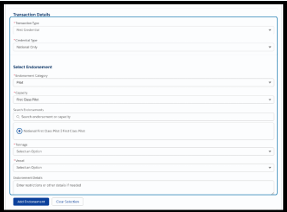
- Show what you are asking for: On a transaction that changes an existing credential, each endorsement also asks what you want done with it: add, upgrade, modify, remove, place in continuity, or renew.
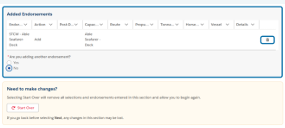
- Review what you have added: Endorsements appear in the Added Endorsements table. If adding another, select "Yes" under "Are you adding another endorsement?". Use the trash icon to remove an endorsement. "Start over" will clear every selection in the section.
What if I am unsure which license I am applying for?
If you do not know which license and version you are applying for, you can browse these resources:
Section III Safety and Suitability
This section of the application will ask you three things: You must answer every question
- Do you hold or are you exempt from a Transportation Worker Identification Credential (TWIC)
Note: You are not TWIC exempt from your original application. Therefore, you should not check this box. 💡 TIP! You must submit a copy of your TWIC card with your original application
- Do you have a criminal or drug-related record to disclose
Note: You do not need to check "Yes" if you have already disclosed a conviction on a previous application for Section III: Safety and Suitability, Criminal Record
- Do you consent to a National Driver Registry Check:
Note: The National Driver Registry consent is mandatory for an original credential, renewal or a new officer endorsement. It is not required for a Document of Continuity.
By checking this box, you authorize the National Driver Registry (NDR) to provide the U.S. Coast Guard (USCG) with information regarding your driving record. This consent allows for a single access to the NDR to verify the information provided in your application.
By granting this authorization, you acknowledge that the USCG will make the information received from the NDR available to you for review and written comment before taking any action, such as disapproving your application or taking further action against your Merchant Mariner Credential.
Authority: 46 U.S.C. 710(g), 46 U.S.C. 7302(c), and 46 U.S.C. 7505
If you answered Yes to any Criminal Record question, you must provide additional details by:
- Completing the Form CG-719C form in Navita. It will launch automatically at the end of the application
- Upload the applicable supporting documents
- Do both: Complete the CG-719C form and upload documents.
Section IV: Mariner's Consent/Certification
What is Section IV: Mariner's Consent/Certification #1 asking me?
Section IV covers four things before you can move on:
- Mariner Outreach System: Optional participation for the MARAD program that records your availability for sealift service.
❌ If you do not wish to participate, you can select "No thanks, I do not wish to participate at this time."
✔ If you select "Yes, I would like to participate," you are agreeing to the following: I consent to voluntarily participate in the Mariner Outreach System, which may be used by the Maritime Administration (MARAD) in the event of a national emergency or sealift crisis. In such situations, MARAD may share my contact information with an appropriate maritime employment office to assess my availability for potential employment on a sealift vessel. Once consent is given, it remains in effect until revoked, either by a subsequent application or by sending a signed notice of revocation to the U.S. Coast Guard National Maritime Center, 100 Forbes Dr., Martinsburg, WV 25404. For more information, visit https://mos.marad.dot.gov/.
- Continuity Acknowledgment: Applies if you are renewing into continuity
- Parental consent: Required if you are under 18
- Your Certification: Your statement that everything you have entered is true and complete.
⚠Your electronic signature is a legal certification. You are attesting that the information is true and correct. An application found to be fraudulent may be denied for one year from the date of submission, and may be referred for prosecution.
Who is authorized to administer the oath?
On CG-719B, Section IV, #5, you'll find a section below your signature for the signature of an individual authorized to administer the oath. While the form indicates that the oath is required only once in a mariner's career, recent updates have simplified the process:
As of December 17, 2024, the Coast Guard's National Maritime Center (NMC) no longer requires the oath to be notarized for original Merchant Mariner Credentials.
What do I fill out for Section IV: Authorize a third party?
The Third Party Authorization under Section IV, of the CG-719B allows you to designate someone to act on your behalf during the credentialing process. In Navita, that person is called a proxy.
- For Navita Release 1.0, only individuals can be designated. Organizations and Businesses cannot.
- You can select 6d. Sections 6a to 6c are not available for selection
- After choosing the authorization option, enter the third party's name, point of contact, address, phone number, and email address
- Certify and electronically sign the authorization before you continue.
- A person who is registered as a Mariner User in Navita cannot serve as a proxy.
If you completed the forms on your own, you can leave this section blank.
Do not put Mariners Learning System down for this section. We are NOT your third party.